On October 5, OpenAI said it will start putting a watermark in ChatGPT's text. There are no hidden characters and nothing you could spot by reading closely. The signal sits in which words the model picks. OpenAI calls it textGrain, and its own description is an "invisible statistical signal to the model's word choices."
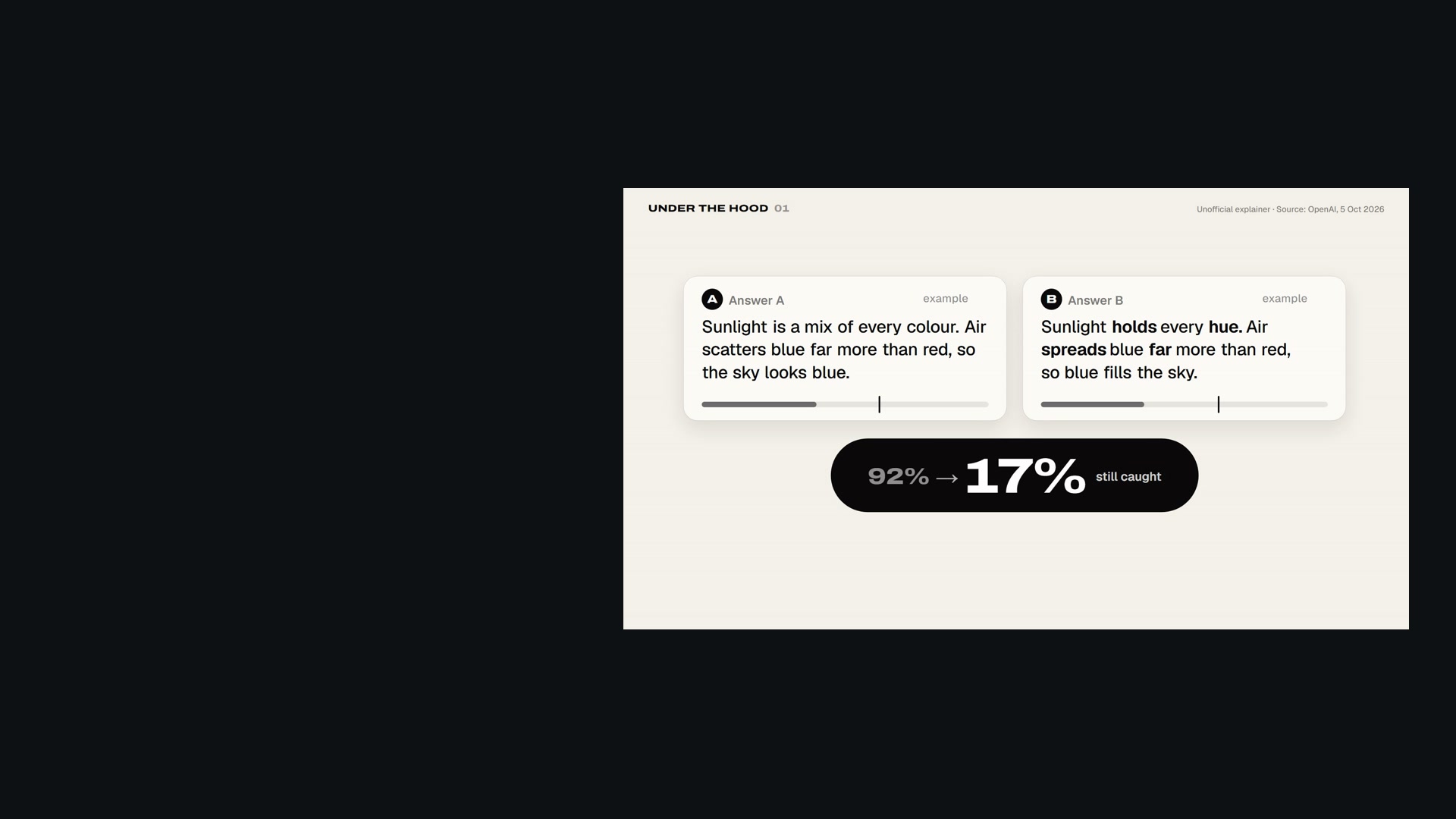
We made a 50-second explainer around one question. Put two answers side by side, one signed and one not. Can you tell which is which? You can't, and nobody else can either without the key. You can watch it on this page or as a YouTube Short. It's an unofficial explainer, and we're not affiliated with OpenAI.
Who gets it, and why now
Over the coming weeks OpenAI will add the watermark to eligible ChatGPT and Codex text in the European Union, on every plan. It is not a global default. API customers anywhere can opt in for select models, and it stays off unless they do. The trigger is the EU AI Act, which requires generated text to be identifiable in a machine-readable way. The Act's transparency rules started to apply on August 2, 2026, and systems that were already on the market have until December 2 to meet the marking requirement.
One signal, many limits
How a model picks a word
A language model writes one token at a time. A token is a word or a piece of one. At each step it has a list of candidates with odds. OpenAI's technical report, written with researchers at the University of Pennsylvania and Yale, uses a simple example. After "The morning was", the candidates include warm, cold, mild, calm, sunny and bright, each with its own probability.
textGrain changes how the pick is made, not what the answer says. A secret key, together with the last few words, sorts the candidates into groups and tilts the odds toward some of them. Inside the chosen group the model keeps its own odds, and a budget limits how much of its randomness the watermark can use. The nudge is small. OpenAI's benchmark table shows no meaningful drop in quality with the watermark on.
What the numbers say
Long answers get caught
At a 1% false-alarm target, about 95% of 400-token passages were detected, and 80% at 200 tokens.
A quarter of the words
Swapping 25% of the words for synonyms cut detection from about 92% to 17% in OpenAI's own test.
No public checker
The detector goes to approved researchers and expert organisations, case by case, not to the public.
How the detector reads it
According to the report, the detector needs only two things: the text and the secret key. It rebuilds the same groups at every position, gives each word a score, adds the scores up, and compares the total with what ordinary, unwatermarked text would score. If the total clears the line, it reports a watermark.
That is why one sentence proves little and a long answer proves more. At a 1% false-positive target, OpenAI's detector found the watermark in about 80% of 200-token passages and about 95% of 400-token passages of psychology-style text. For maths, where there are fewer ways to say the same thing, the rates were substantially lower.
The twist: change a quarter of the words
OpenAI published the weak spot itself. In a test on 400-token passages, replacing 10% of the words with synonyms cut detection from about 92% to 66%. Replacing 25% cut it to 17%. In the film that is the moment B's score falls back under the line, and both answers look unsigned again.
The detector also isn't public. OpenAI is opening applications for approved researchers and expert organisations, with access granted case by case, because of the risk of both missed watermarks and false positives. So you can't run your own text through it, and neither can your manager or your professor.
What a watermark can't tell you
This is the section we'd put on every slide that cites one of these checks. OpenAI lists the limits itself. A watermark does not identify the user. It doesn't measure how much a person contributed or edited, and it doesn't establish who owns the text or who is responsible for it. It doesn't tell you whether the text is true. And not finding a watermark doesn't prove a human wrote it: the text may be too short, edited or translated, written before watermarking started, or produced by another company's tool.
For anyone in audit, compliance or finance, that places textGrain clearly. It is a provenance signal about one vendor's tools, not proof of authorship. When someone says "the checker caught it", the next questions are which checker, who held the key, and how long the passage was.
What we left out
There is no algorithm diagram in the film beyond what OpenAI's report states, and we didn't borrow the "green list" analogy from older watermarking papers. The two answers in the film are our own examples, labelled as such. "The morning was" and its starting odds come from OpenAI's report, and the nudged odds are illustrative. We also left out any claim that the watermark is live in ChatGPT today. OpenAI says it rolls out over the coming weeks. Every claim here comes from OpenAI's announcement, the textGrain technical report and the European Commission's AI Act implementation timeline. We checked all three live on October 5.
The zoom out
Text watermarking is early, and OpenAI says so: strong results under ideal conditions don't guarantee reliable detection in everyday use. The rollout is careful in the right ways. It is EU-only at first, the detector is limited to researchers, and the list of what a watermark can't prove is long and honest. The risk sits downstream, when a "watermark found" or "no watermark" result gets treated as a verdict about a person. Read it as one signal among several. Then ask what it can actually see.
Three questions to ask
- Which checker? Only the key-holder can detect textGrain, and the detector isn't public.
- How long was the text? Detection improves with length and drops for maths-style answers.
- What can it see? Not who wrote it, how much was edited, or whether it's true. No mark doesn't mean human.
A signal, not a verdict.
textGrain can show that an OpenAI system touched a passage. It can't name a person or prove a human wrote it. Treat a result as one input, and ask what it can actually see.