On October 8, Anthropic took the beta label off Claude Design and put it on every Claude plan, including Free. The part that got less attention is where you can use it. Claude Design started as a website. It now runs inside Claude Code too, in the terminal and in the desktop app, behind one command: /design. That command first appeared in Claude Code as a research preview in August.
We made a 60-second film that walks through the whole flow. You can watch it on this page or on YouTube.
The flow in 5 steps
- Ask. Type /design and a brief, for example "/design a launch poster for our spring menu". Plain words work too: you can ask Claude to turn an idea into a design.
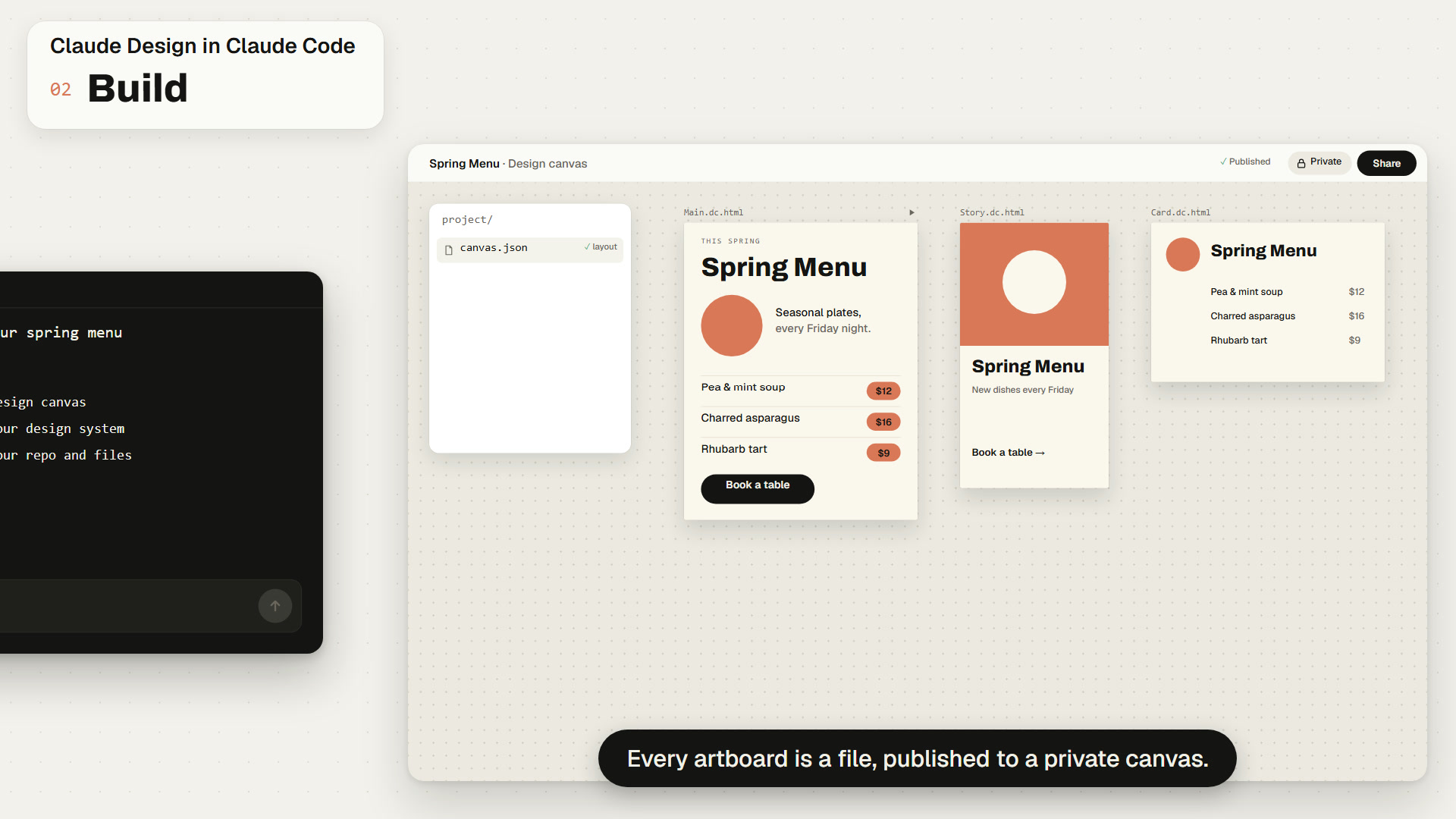
- Build. Claude drafts the design as artboards on one canvas and publishes the canvas as a Claude Design artifact, a private page on claude.ai. If your account has a design system, a new design starts from it.
- Edit. Open the canvas in a desktop browser. The Claude Code docs put it in one line: "Select an element on an artboard and change it, and your edits save automatically." You can also drag, resize and align things directly.
- Revise. Leave a comment on the canvas for Claude, or go back to the session and ask for the change. Claude publishes again to the same link, so anyone who has the page open sees the update.
- Share. A new artifact is visible only to you. The Share control in the page header decides who else can open it. You can export an artboard as PNG or PDF, and the Export menu can send the design on to other tools.
What you need, and what is not there yet
When the link has scrolled out of the terminal, /artifacts lists everything you own.
What I found using it
I used /design this week to draft the first version of this explainer. What I noticed was the handoff that went away. The brief, the draft, the review notes and the revision all lived in one session and one link. I work in finance, not design, and the first draft was good enough to react to. If you are not a designer, that is most of what you need.
Three things that shape how you use it
Steps from brief to shared link
Ask, build, edit, revise, share. The brief, the draft and the review notes stay in one session and one link.
Design turns on by default
Until then an owner turns the Design template on in Organization settings. /design also needs Claude Code v2.1.265 or later.
The standalone site closes
Design systems made at claude.ai/design need to be migrated before then.
The fine print
- /design needs Claude Code v2.1.265 or later, a session signed in with /login, and a plan where artifacts are available: Pro, Max, Team or Enterprise.
- On Enterprise plans an owner turns the Design template on. Anthropic says it turns on by default on October 15.
- On Team and Enterprise plans, public links stay off until an owner enables external sharing.
- Claude Design has no version history yet, and Anthropic's help page says two people editing at the same time is "still basic".
- The standalone site at claude.ai/design closes on December 14. Design systems made there need to be migrated before then.
- Design work counts toward the same usage limits as the rest of Claude.
- One loose end: the announcement says Design is out of beta, while the Claude Code docs still describe the Slides, Design and Docs templates as beta.
Why a finance team should care
Most of what a finance team designs is not called design. It is a one-pager for the board, a process map, or a mock-up of a dashboard before anyone builds it. Those usually wait in a queue for someone with the right tool. If the person who owns the numbers can get to a reviewable draft from one sentence, the queue gets shorter. The check does not go away. Someone still has to confirm that what the page says is true before it leaves the team.
Sources. Claude Code docs, "Share session output as artifacts" and "Week 34, August 17 to 21, 2026". Claude Help Center, "Get started with Claude Design". Anthropic, "Build live dashboards and animate explainers with Claude", October 8, 2026. We checked all four live on October 10. The poster, the menu and the prices in the film are made-up demo content, and the film compresses the steps: a real draft takes longer than a few seconds.
Three things to try
- Draft one real page. Run /design with a brief for something your team actually needs, like a one-pager or a process map.
- Review on the canvas. Change one thing by hand, then leave one comment for Claude and see what comes back on the same link.
- Check before you share. The page starts private. Confirm every number on it against its source before anyone else gets the link.
The draft is one sentence away. The check is still yours.
A brief in the terminal now gets you artboards you can edit, comment on and share from one link. That shortens the wait for a first draft. It does not replace the person who confirms the page is true before it leaves the team.