- SPECIMEN
Devin Review
- FILED AS
Automated Code Review That Catches What Humans Miss
- INTAKE DATE
- 2026-06-08
- CLASS
- Coding
- METHOD
- desk research, filed before the Lab logged its counts
No dimension scores were recorded for this specimen, so no Koda Score is published. Read the verdict instead.
Code review that organizes diffs, detects moved code, and flags potential bugs. It sits inside your pull request workflow so issues surface before senior engineers even open the PR.
Open Devin Review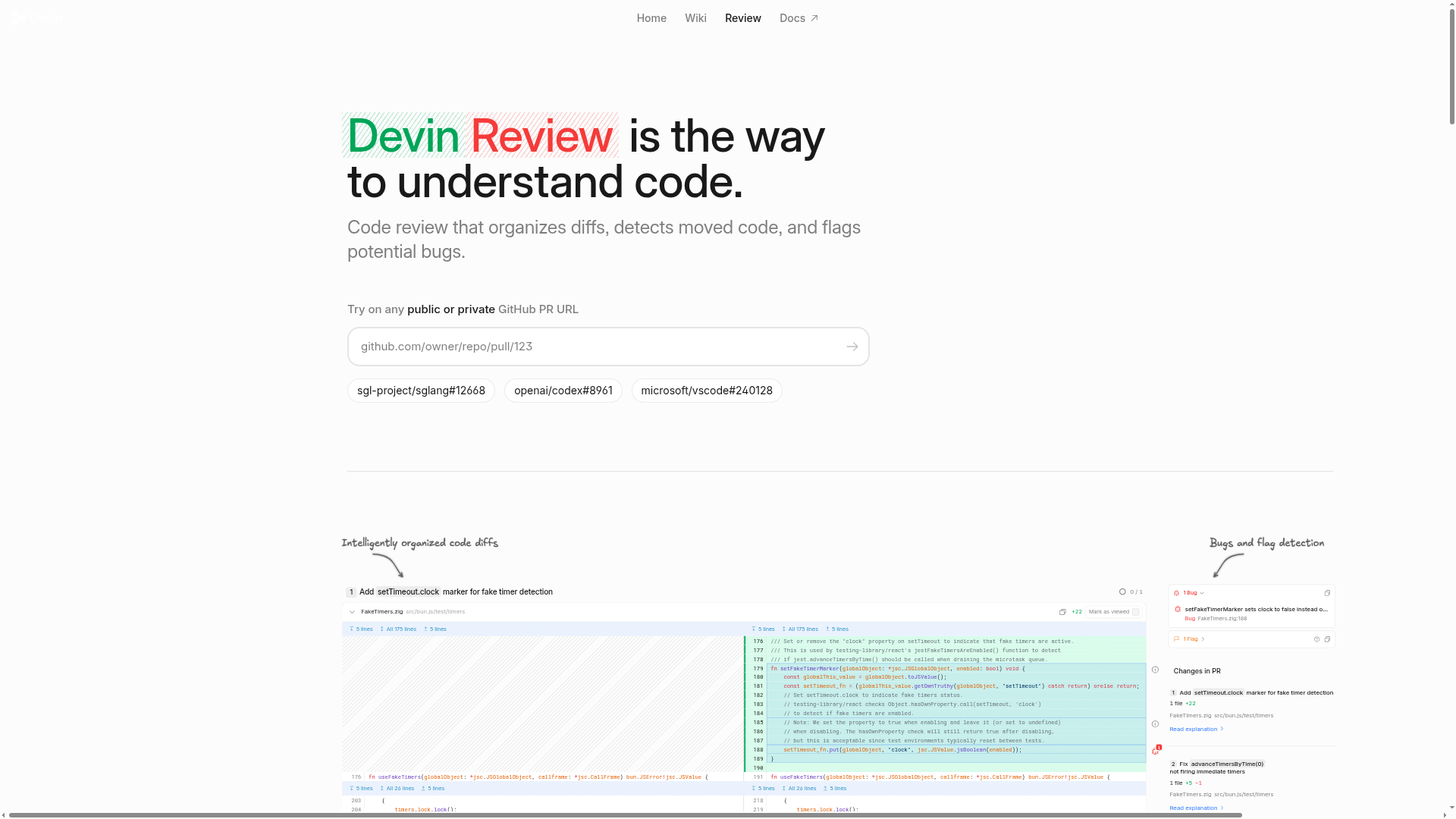
The verdict.
Devin Review is best suited for small to mid-size teams where senior engineer time is the bottleneck. If your team regularly ships PRs that sit in review queues for hours (or days) because the one person who understands the legacy codebase is overloaded, this tool pays for itself quickly. At $19/month per seat for private repos, it is a low-risk bet for teams that want faster, more consistent first-pass reviews. It will not replace your senior reviewer, but it will make sure they spend their time on architecture decisions instead of catching moved code blocks and obvious bugs.
Pricing, straight.
Two straightforward tiers. No per-seat multipliers on the free plan.
- Access to public GitHub PRs
- Basic code review capabilities
- Access to private GitHub PRs
- Advanced code review features
- Priority support
Pricing as captured on 2026-06-08. Check the live site before you commit.
Note: pricing is per user. The free tier is genuinely useful for open source contributors reviewing public repos.
What it actually does.
What actually matters when you are evaluating this tool.
Intelligently Organized Diffs
Instead of dumping a raw diff, Devin Review groups related changes together. Refactors that touch 15 files get presented as a coherent narrative, not a wall of green and red.
Moved Code Detection
The tool automatically identifies when code has been moved or copied rather than rewritten. This eliminates the most tedious part of reviewing large refactors: figuring out what actually changed versus what just relocated.
Proactive Bug Flagging
Goes beyond linting. Devin Review flags potential logic errors, null reference risks, and patterns that commonly lead to production bugs. The output is human-readable, not cryptic error codes.
PR Review Summaries
Generates a plain-language summary of what a PR does before anyone opens it. Senior engineers can triage review requests in seconds instead of clicking through every file.
GitHub-Native Integration
Lives directly in your GitHub workflow. No separate dashboard to check, no context switching. Reviews appear as comments on the PR itself, right where your team already works.
Jest and Testing-Library Support
Understands test files written with Jest and Testing Library. It can flag when test coverage is missing for new logic paths or when test assertions look incomplete.
Who it is for.
Not every team needs automated code review. Here is where Devin Review actually makes a difference.
Teams Onboarding Junior Engineers
New hires lack context on legacy codebases. Devin Review acts as a first-pass reviewer that catches patterns and conventions the junior dev does not know about yet. This reduces the back-and-forth cycle on PRs from 3-4 rounds to 1-2.
Overloaded Senior Engineers
If your tech lead is the bottleneck on every PR, Devin Review handles the mechanical review work. The senior engineer can focus on architectural concerns, design patterns, and business logic instead of spotting null checks.
Open Source Maintainers
The free tier covers public repos. If you maintain an open source project and receive external contributions, Devin Review can pre-screen PRs before you invest time reviewing them manually.
Educators and Bootcamp Instructors
Teaching coding principles through real code review is powerful, but reviewing 30 student PRs is brutal. Devin Review can provide initial feedback on common issues, letting instructors focus on higher-order teaching moments.
The honest part.
Where Devin Review falls short. These are worth knowing before you commit.
JavaScript-Centric Ecosystem
The integrations list tells the story: GitHub, Jest, Testing Library. If your stack is Python, Go, Rust, or anything outside the JavaScript ecosystem, you are getting a significantly less capable experience. The core diff organization works across languages, but the smart bug detection and test awareness are tuned for JS and TypeScript. Teams running polyglot codebases should test thoroughly before committing.
GitHub Only
No GitLab, no Bitbucket, no Azure DevOps. If your organization uses anything other than GitHub for version control, Devin Review is not an option. This is a hard blocker for many enterprise teams.
Limited Change Detection Scope
The tool excels at detecting moved code and obvious bug patterns, but it does not catch everything. Complex business logic errors, race conditions, and security vulnerabilities are still firmly in the domain of human reviewers. Do not treat this as a replacement for security audits or thorough manual review on critical paths.
Private Repos Require Paid Plan
This is standard for developer tools, but worth noting. The free tier is limited to public repositories. Any real production use on proprietary code requires the $19/month Pro plan. There is no team or enterprise tier listed, which raises questions about volume pricing for larger organizations.
Open it
Point it at a public repo for free, or start the Pro plan at $19/month for private repositories.