- SPECIMEN
CapWords
- FILED AS
Photo-to-flashcard language tutor that turns objects around you into vocabulary
- INTAKE DATE
- 2026-08-02
- CLASS
- Productivity
- METHOD
- 1 page scraped, 3 search passes, 13 community sources
Koda Score = weighted blend: capability 35, ease 20, value 25, momentum 20.
An Apple Design Award winner that solves exactly one problem well: naming the things in front of you in a language you barely speak.
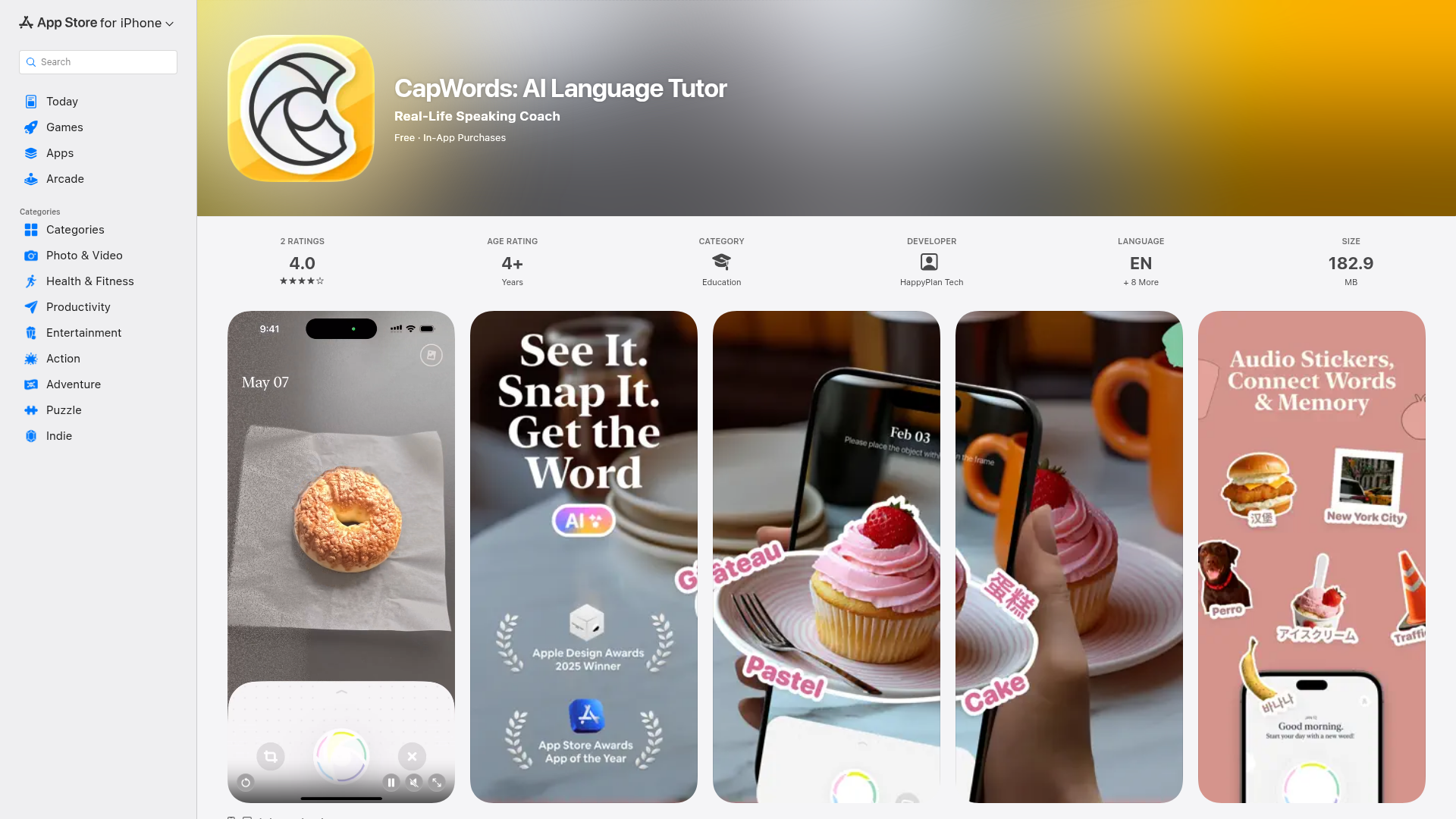
Captured: apps.apple.com/cd/app/capwords-ai-language-tutor/id6738896465, the store listing, not the product itself.
CapWords is genuinely pleasant and free to try, and the photo-as-memory-anchor trick works better than generic flashcard decks for objects, signs and menus. That makes it a fit for travelers, beginners and visual learners who want concrete-noun vocabulary tied to real places, not a curriculum. If you need grammar, structure or serious speaking reps, though, this is a companion app, not your main one.
What it actually does.
Instant word capture
AI recognizes and extracts text or objects from a photo and turns them into vocabulary entries on the spot.
Photo-linked flashcards
Every word keeps the image you found it in, so the picture becomes the memory anchor during review.
Contextual AI definitions
Rather than a flat dictionary gloss, it uses photo context to produce relevant meanings, example sentences and usage notes.
Spaced repetition review
Captured words resurface on an interval schedule intended to hit just before you would forget them.
Speak mode
A recent major update, Your Day Spoken, turns your actual day into conversation practice instead of scripted drills.
Offline word bank
Your saved vocabulary stays available without a connection, useful when you are abroad without data.
Progress tracking and export
Tracks what you have already seen and lets you export words out to other apps.
How you would actually use it.
Concrete setups pulled from the research, not feature-list hand-waving.
The hotel room sweep
Traveler on day one in a new country
Stand in your room or a corner shop and photograph ten everyday objects, letting CapWords build the deck for you. Run the spaced repetition review that evening.
A vocabulary set of words you will physically need within 48 hours, each tied to a place you remember.
Menu decoder
Anyone eating out abroad
Snap the menu or the street sign, let the AI extract and define the unfamiliar items in context, then save them to the offline word bank.
You order without pointing, and the words stay in review rotation instead of evaporating.
Textbook and article skim
Student or test-prep candidate
Photograph unfamiliar terms while reading instead of typing them into a separate flashcard app, then export the deck if you already live in another study tool.
Capture friction drops to near zero, which is usually the reason vocab logging dies.
Jargon capture at work
Professional learning industry terminology
Shoot slides, labels or documentation you do not fully understand and let the contextual definitions do the first pass.
A private glossary of the terms your specific job actually uses.
Pricing, straight.
Core capture and review, but reviewers report a cap on free scans.
Two monthly price points appear across storefront listings.
Multiple yearly and promo tiers are listed, so what you see depends on region and offer.
At the low end of the yearly tiers this is cheap for what it does; the spread of listed prices and the free scan cap are the parts to check before you commit.
Pricing as captured on 2026-08-02. Check the live site before you commit.
What people online are saying.
Real reactions surfaced during research. Paraphrased faithfully, linked to source.
Reaction is thin and mostly comes from review sites and a small Product Hunt launch rather than any real Reddit or Hacker News thread, and it splits cleanly into praise for the capture idea and complaints about depth, free limits and stability.
Fun, engaging and very easy to use, especially good for beginners and visual learners, but the limited free scans are frustrating.
Users like the innovative approach and the aesthetic, easy design, and call out item recognition accuracy as a strength, though there are reports of crashes, inconsistent voice quality and requests for deeper dictionary features.
Small but uniformly positive launch reception, rated 5.0 from three reviews.
Strong at vocabulary acquisition through images, but limited in depth and structure compared with a full course.
The field.
Broad, gamified language courses with a structured path.
PICK IT WHENYou want a curriculum that tells you what to do next, not a capture tool.
Vocabulary-heavy platform built around visual flashcards and repetition.
PICK IT WHENYou like flashcard drilling but want pre-built decks and an established platform rather than shooting your own photos.
Traditional lesson structure with real grammar coverage.
PICK IT WHENGrammar and sentence construction matter more to you than naming objects.
The honest part.
- No structured learning path, so nothing tells you what to study next.
- Weak grammar support and limited speaking practice per multiple reviews.
- Occasional recognition inaccuracies, plus reported crashes and inconsistent voice quality.
- iPhone and iPad only, requiring iOS 17.0 or later, with no Android or web version.
- Free tier is capped on scans and premium pricing varies across listed tiers, so the real cost is not obvious upfront.
Getting started.
Time to first value: about 5 minutes
Install on an iPhone or iPad running iOS 17.0 or later; it is free to download at 182.9 MB.
Point the camera at a sign, menu, textbook page or object and let the AI extract and define the words.
Open the review queue that evening and let spaced repetition handle the words you captured.
Quick answers.
Is it actually free or is that a trial?
The app is free to download with in-app purchases, and reviewers specifically flag a cap on free scans as the main limitation. Premium is listed at roughly USD 4.99 to 5.99 monthly and USD 12.99 to 29.99 yearly depending on the storefront and promo. Treat the free tier as a real evaluation, not a full version.
Will this replace Duolingo or Babbel?
No. Reviewers consistently frame CapWords as narrower and more situational, strong on photo-based vocabulary and weak on structure and grammar. Run it alongside a structured course rather than instead of one.
How reliable is the recognition?
Listing summaries cite item recognition accuracy as a strength, but at least one review notes occasional recognition inaccuracies. Expect it to be dependable on clear text and common objects and to slip on cluttered or ambiguous scenes.
Does the developer still ship?
Yes. There is a Your Day Spoken major update on the listing that adds conversation practice built from your actual day, and the app carries Apple Design Awards 2025 Winner plus App Store Awards and Editor's Choice badges. Public discussion volume is still small, with only two ratings averaging 4.0 on the storefront we reviewed.
Install it before your next trip, drill the room you are standing in, and keep a structured course running alongside it.
Field research: 1 pages scraped · 3 search passes · 13 community sources. Reviewed by the Koda desk on 2026-08-02.