- SPECIMEN
Grok
- FILED AS
Free AI assistant with live X and web search, image and video generation
- INTAKE DATE
- 2026-08-11
- CLASS
- AI Platform
- METHOD
- 1 page scraped, 3 search passes, 14 community sources
Koda Score = weighted blend: capability 35, ease 20, value 25, momentum 20.
Grok is the assistant you open when your main one is confidently three months out of date.
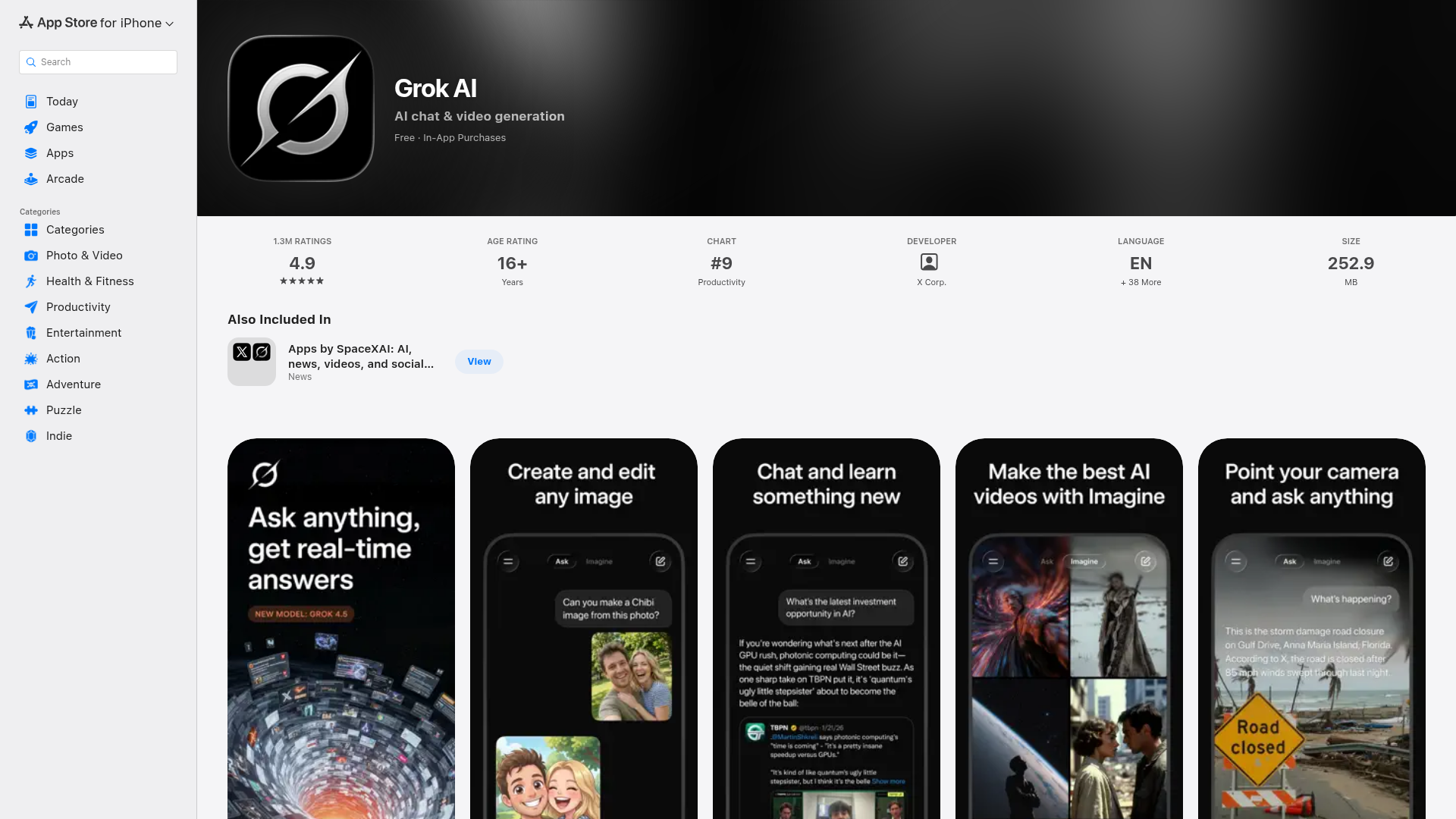
Captured: apps.apple.com/us/app/grok-ai/id6670324846, the store listing, not the product itself.
Grok is worth installing as a free second opinion for anyone whose questions hinge on what happened in the last few hours, especially on X. It is not a replacement for your primary assistant; reviewers repeatedly flag hallucinations, moderation interruptions and abrupt usage caps, so treat every social-sourced claim as a lead to verify rather than an answer.
What it actually does.
Real-time X and web search
Pulls current posts, trends and web results so answers reflect what is happening now rather than a training cutoff.
Advanced X search
You can ask Grok to run deeper searches across X to see what people are actually saying on a topic.
Grok 4 reasoning and deep research
Handles math, science and coding questions and can run longer web research passes on request.
Grok Imagine
Generates images and 6-second videos with sound from text prompts, and can animate a static photo.
Grok Image 2.0 editing
The latest update adds background removal, magic wand edits and smart resizing for photos, infographics and ads.
Voice mode with live camera
Talk to Grok in natural speech and share your camera view in real time, with selectable personalities.
Document and link analysis
Upload documents and photos or paste links in chat and have Grok summarize or explain the content.
AI companions
Animated characters like Ani, Rudi and Valentine offer persona-driven chat, which is part of why the app carries a 16+ rating.
How you would actually use it.
Concrete setups pulled from the research, not feature-list hand-waving.
The staleness check
Founder or analyst who got a suspiciously old answer
Paste the same question into Grok immediately after your primary assistant answers, and ask it to cite what it found on X and the web in the last 24 hours.
You catch stale answers in under a minute and get pointers to the live sources worth reading.
Platform status triage
Support lead or on-call engineer
Ask Grok what people on X are reporting about a specific service or app right now, then open the posts it surfaces before you tell anyone anything.
An early read on whether an outage is yours or theirs, minutes before official status pages update.
Trend brief before you post
Social or community manager
Run an advanced X search through Grok on your topic, ask for the recurring arguments and sentiment split, then verify the top posts by hand.
A same-day picture of the conversation you are about to walk into, without scrolling for an hour.
Quick visual for a live post
Solo marketer working against a deadline
Generate an image or a 6-second video from a prompt in Imagine, then use Grok Image 2.0 editing to remove the background and resize for the target placement.
A serviceable asset in minutes, with the caveat that reviewers report distorted details on finer photo edits.
Pricing, straight.
Full app install with chat, real-time search, voice and Imagine; reviewers report tight prompt caps and sudden usage limits.
Limited access to AI capabilities.
Full access to AI capabilities.
Enhanced features with additional usage credits.
The free tier is the honest value here; G2 reviewers already call the paid plans expensive for what they deliver, and Trustpilot reviewers complain about price hikes.
Pricing as captured on 2026-08-11. Check the live site before you commit.
What people online are saying.
Real reactions surfaced during research. Paraphrased faithfully, linked to source.
Mixed to negative overall: people genuinely rate the real-time X awareness and speed, but hallucinations, moderation and usage limits come up again and again, which is exactly why the consensus use is second opinion rather than daily driver.
Reviewers who like the free version point to real-time search and trend analysis, and use Grok as a cross-check when other assistants feel stale.
Founders on Product Hunt say it is fast and accurate enough for data analysis, writing and coding, and praise the real-time knowledge for live automations and agent workflows.
Trustpilot reviewers say it invents information and gives incorrect answers on more complex tasks, and complain about constant moderation, cut-off responses and usage limits appearing out of nowhere.
One Product Hunt reviewer rates it far weaker than ChatGPT and DeepSeek, calls it barely useful as a chatbot, and says photo editing distorts details.
G2 reviewers credit fact-checking, fast inference and useful real-time information, while others in the same set report inaccurate responses, integration problems and a high price for the output.
The field.
Web-grounded answer engine built around fast search with citations.
PICK IT WHENPick it when you need the sources attached to the answer, not just a fast read on what is happening.
General-purpose assistant with broad reasoning, writing and workflow coverage.
PICK IT WHENPick it as your primary assistant when polish and general reasoning matter more than live X and trend awareness.
Assistant favored for long-form writing and document work.
PICK IT WHENPick it when the job is drafting or working through long documents rather than chasing real-time context.
The honest part.
- Hallucinations and incorrect answers on complex tasks are the single most repeated complaint across Trustpilot and G2.
- Usage feels unpredictable: reviewers report slow processing, responses cut off mid-answer and sudden limits, and one reviewer calls the free tier effectively a demo.
- Anything sourced from social feeds needs manual verification before you repeat it; the app surfaces posts, it does not vouch for them.
- Image and video tools are inconsistent, with reports of heavy moderation, outright failures and distorted details in photo editing.
- Paid tiers run from $10.00 to $300.00 with no separate pricing page scraped, and reviewers flag both price hikes and poor value at the top end.
Getting started.
Time to first value: about 5 minutes
Install Grok AI from the App Store on iPhone or iPad; it is a free download at 252.9 MB.
Sign in and ask one question you already know the current answer to, so you can calibrate how much it hallucinates.
Re-run a question your primary assistant answered badly, then open the X and web sources it cites before trusting any of it.
Quick answers.
Is Grok actually free?
The App Store listing is a free download with in-app purchases, and reviewers do use the free version for real-time search and trend analysis. Paid plans are listed as SuperGrok Lite at $10.00, SuperGrok at $30.00, SuperGrok Plus at $100.00 and SuperGrok Heavy at $300.00, plus credit packs at $5.00, $20.00 and $50.00. Expect prompt caps on the free tier; one YouTube reviewer describes it as a demo.
Can I trust what it pulls from X?
Treat it as a lead, not a fact. Trustpilot and G2 reviewers repeatedly report hallucinations and made-up information, and a Hacker News commenter notes the same question can return different answers on different runs. Open the posts and pages it surfaces before you repeat anything.
Should it replace my main assistant?
No. The blunt synthesis across Product Hunt, Trustpilot, G2 and YouTube is that people value Grok as a real-time second opinion rather than the best all-purpose assistant. Keep ChatGPT or Claude for reasoning and long-form work, and use Grok when recency is the whole point.
How good is the image and video generation?
Grok Imagine generates images and 6-second videos with sound, and the Grok Image 2.0 update adds background removal, magic wand editing and smart resizing. Reactions are uneven: a Product Hunt reviewer calls the photo editing poor with distorted details, and Trustpilot reviewers report the image and video tools failing or being heavily moderated.
Keep it on the home screen as your recency cross-check, keep your primary assistant for anything you have to stand behind, and never repeat what Grok pulls off a social feed without checking the source yourself.
Field research: 1 pages scraped · 3 search passes · 14 community sources. Reviewed by the Koda desk on 2026-08-11.