- SPECIMEN
Dreamflow
- FILED AS
Visual AI builder for Flutter apps that keeps prompt, canvas, and code in sync
- INTAKE DATE
- 2026-08-12
- CLASS
- Coding
- METHOD
- 1 page scraped, 3 search passes, 12 community sources
Koda Score = weighted blend: capability 35, ease 20, value 25, momentum 20.
Most AI app builders fall apart the second you hand-edit the widget tree; Dreamflow is built by the FlutterFlow team specifically to survive that moment.
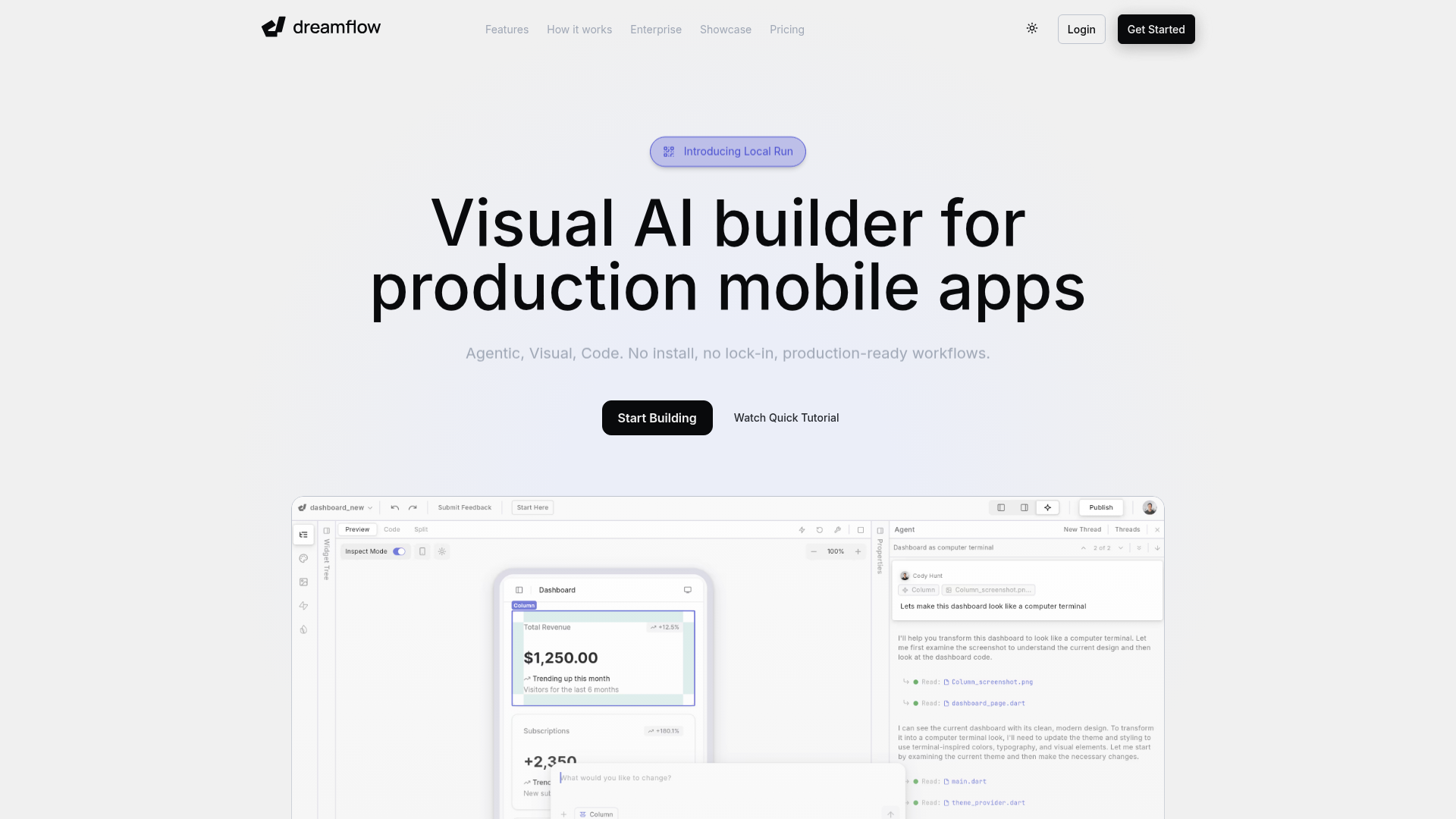
Captured: dreamflow.app on 2026-08-12.
The tri-surface model (agent, canvas, code) is the real differentiator, and it is worth adopting for prototyping and early production work. This is for Flutter developers and product builders who want AI scaffolding without surrendering the codebase, and for teams already comfortable in the FlutterFlow world. Budget for the $20/mo Hobby tier minimum, because code export, local device runs, and store deployment all live behind it.
What it actually does.
Tri-surface editing
Switch between AI prompts, the visual canvas, and Dart code with all three views reflecting the same app state.
Agentic build loop
Describe a feature in natural language and the agent scaffolds the widgets and logic into your existing project.
Model choice
Pick from multiple frontier models in the agent panel, with priority access to premium models on the Pro plan.
Local Run on device
Push the running app to simulators and real hardware from the builder, available on paid plans.
Managed backends
Connect Firebase or Supabase through built-in integrations instead of hand-rolling the plumbing.
One-click deployment
Ship to web on the free tier, and to the Play Store and App Store from Hobby up.
Full code export and Git
Export the complete Flutter codebase on paid plans, with Git version control included at Pro.
Responsive canvas
Build for any screen size across web, iOS, and Android from a single project.
How you would actually use it.
Concrete setups pulled from the research, not feature-list hand-waving.
Same-afternoon device demo
Solo founder pitching an app idea
Prompt the core screen flow, tighten spacing and typography on the visual canvas, then use Local Run to put the build on your own phone.
A tappable app in someone's hand instead of a Figma deck, in a single work session.
Scaffold then take the wheel
Flutter developer on a tight sprint
Let the agent generate the widget tree and state wiring, then drop into the code surface to rewrite the parts that matter and keep prompting on top of your edits.
AI speed on boilerplate without the usual point where hand-edits desync the generator.
Backend-attached prototype
Product engineer validating a feature
Connect Supabase or Firebase through the managed integration, prompt the data-bound screens, and deploy to web for stakeholder review.
A real-data prototype teammates can click through, not a mock.
Escape-hatch evaluation
Tech lead assessing lock-in risk
Run a throwaway project on Hobby, export the full Flutter codebase, and check whether the output is code your team would actually maintain.
A concrete read on lock-in before you build anything that matters here.
Pricing, straight.
Private projects, visual plus code editing, Firebase and Supabase integrations, 1-click web deploy, 10 one-time AI credits.
Adds Play Store and App Store deployment, full code export, local runs on simulators and real devices, 100 credits/mo.
Adds Git version control, priority access to premium models, 500 credits/mo.
Dedicated support, onboarding engagement, advanced access control, bring your own models, SLA, private cloud.
Hobby at $20 is fair for what it unlocks, but the 10-credit one-time free allowance means you cannot meaningfully evaluate the AI without paying, and the Pro jump to $90 is steep unless you need Git and heavy credit volume.
Pricing as captured on 2026-08-12. Check the live site before you commit.
What people online are saying.
Real reactions surfaced during research. Paraphrased faithfully, linked to source.
Too new for a large public verdict, but the early signal is consistent: real enthusiasm for the prompt-plus-visual-plus-code workflow, paired with complaints about previews, code access, and support responsiveness.
Reviewers say having prompting, visual editing, and direct code control in one workflow is what lets them move from idea to prototype fast, and they call out the low learning curve and solid design output.
A FlutterFlow community post called it very impressive, pointing out it could generate the code and UI for something like an Instagram Reels clone from a plain-language request.
One reviewer hit preview failures and got frustrated trying to access and download their code.
A two-week trial writeup was titled bluntly around a dead app and zero product support, signalling real frustration with reliability and help channels.
A builder testimonial on the Dreamflow site describes visual development, AI generation, and code together as the holy trinity of dev.
The field.
The established visual Flutter builder from the same team behind Dreamflow.
PICK IT WHENYou want the mature, well-documented visual builder and do not need an AI agent driving the build.
General-purpose AI app builder that generates working apps from prompts.
PICK IT WHENYour target is a web app and you are not committed to Flutter or native store deployment.
Fast AI prototyping environment for generating app scaffolds in the browser.
PICK IT WHENYou need a throwaway prototype quickly and do not care about a long-lived, editable Flutter codebase.
The honest part.
- Free tier ships only 10 one-time AI credits, which is enough to look around and not enough to build.
- Full code export, local runs on real devices, and app store deployment are all gated behind the $20/mo Hobby plan.
- Git version control does not appear until the $90/mo Pro tier, which is awkward for any team workflow.
- Early reviewers report preview failures, performance issues, and friction downloading code, plus at least one loud complaint about support quality.
- No extensive offline capabilities, and customization on the free tier is limited.
Getting started.
Time to first value: about 30 minutes to a running prototype, longer if you want it on a physical device
Sign up at app.dreamflow.com and start a private project.
Prompt the feature or screen you want, then refine layout and styling on the visual canvas.
Drop into the code surface to adjust the Dart, then deploy to web or use Local Run to push to a simulator or device on a paid plan.
Quick answers.
Can I get my code out, or am I locked in?
Full code export is listed on the Hobby plan and above, and the site explicitly markets no lock-in. That said, Product Hunt reviewers have reported friction actually accessing and downloading code, so test the export path on a throwaway project before you trust it.
How is this different from FlutterFlow?
Dreamflow comes from the same team but leads with an AI agent as a first-class editing surface alongside the canvas and code, with all three staying in sync. FlutterFlow is the established visual Flutter builder; Dreamflow is the AI-first take on the same territory.
Is the free plan enough to evaluate it?
Not really. You get private projects, visual plus code editing, backend integrations, and web deployment, but only 10 one-time AI credits and no local device runs or code export. Plan on a month of Hobby at $20 for a fair trial.
Can I actually ship to the App Store from this?
Yes, one-click deployment to the Play Store and App Store is listed starting on the Hobby plan, along with running locally on simulators and real devices. Given the early reports of reliability issues, treat your first store submission as a real test rather than a formality.
If your stack is Flutter and you keep losing AI-generated scaffolds to manual edits, this is the most direct fix on the market right now. Just go in knowing the free tier is a demo, not a workspace.
Field research: 1 pages scraped · 3 search passes · 12 community sources. Reviewed by the Koda desk on 2026-08-12.