- SPECIMEN
NeuralAgent
- FILED AS
AI agent that operates your desktop, plus a web app that runs scheduled research and monitoring
- INTAKE DATE
- 2026-09-18
- CLASS
- Productivity
- METHOD
- 1 page scraped, 3 search passes, 24 community sources
Koda Score = weighted blend: capability 35, ease 20, value 25, momentum 20.
Desktop computer use plus scheduled web agents is a broad feature set but early and thinly validated; plain-English tasks with no setup make onboarding quick; the free tier is generous but paid prices are unpublished; a 3.0 launch, open-source release, macOS and Windows apps, and voice mode show real shipping pace against a small review base.
8 MIN READTwo products wear this name right now: an open-source desktop agent that drives Windows and macOS like a human would, and the web app at neuralagent.app that schedules research, writing, and monitoring agents into a searchable Memory on ten free tasks a day. The zero-cost, no-card entry makes it cheap to trial for recurring digests and competitor checks, and that is where it earns a spot. Independent testing amounts to one 7/10 writeup and a handful of Product Hunt ratings, so nobody should let it loose on a machine full of logged-in accounts yet.
It claims to click through your desktop in about 285 milliseconds per action, and the free plan lets you test that promise ten times a day without handing over a card.
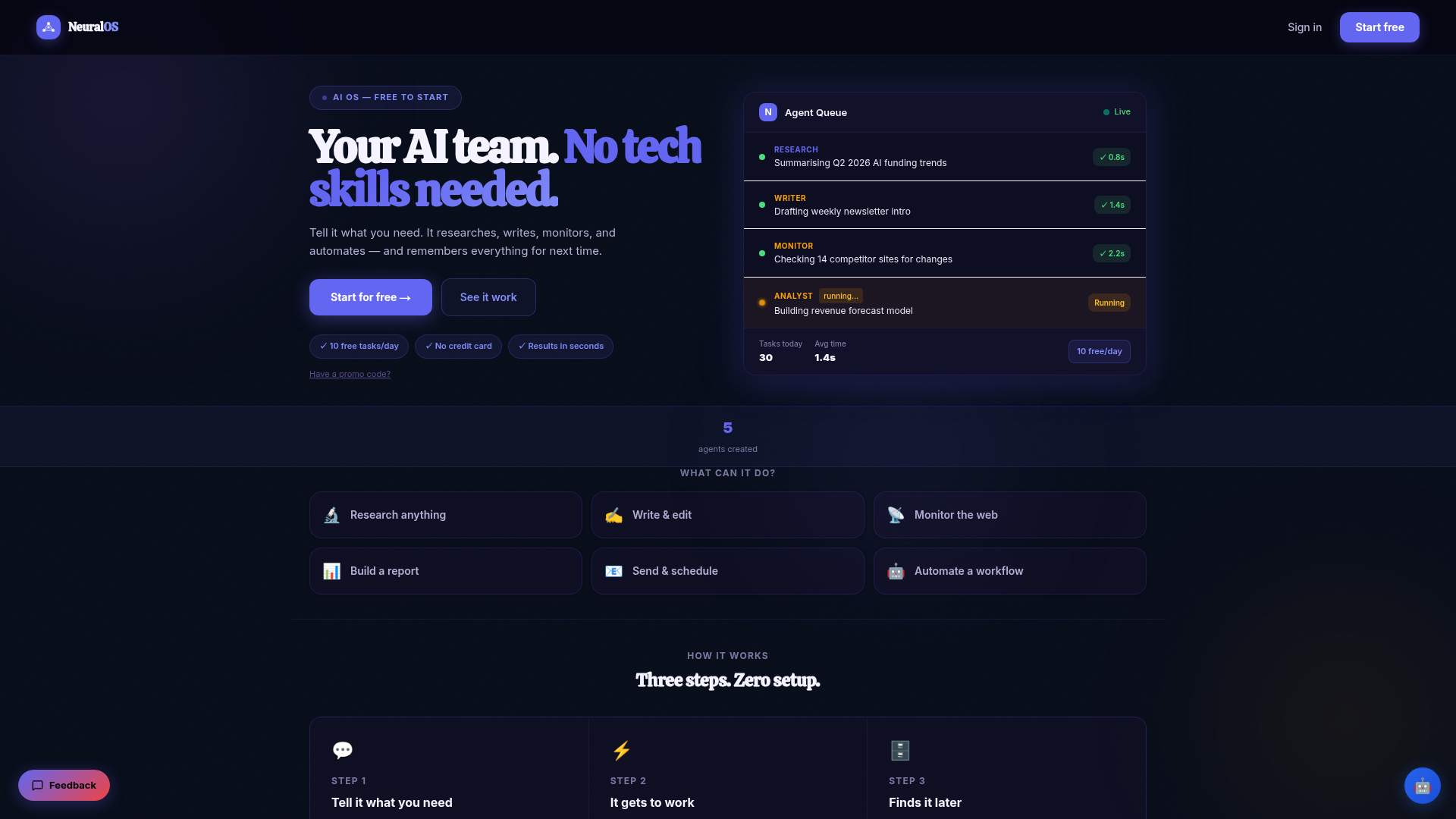
Captured: neuralagent.app on 2026-09-18.
The short version.
4 LINESThe web app gives you 10 free tasks a day with full Memory access and no credit card, enough for a competitor check, a news digest, and a content draft on repeat.
The desktop version is open source, runs on Windows and macOS, supports local models via Ollama, and claims roughly 285ms per UI action.
Pro removes the daily cap and adds API access, Team adds shared Memory, but neither price is published anywhere in the research.
Public feedback is thin: one 7/10 independent review and one or two Product Hunt ratings, so treat stability claims as vendor claims.
What it actually does.
8 CAPABILITIES- Fast UI execution
- The 3.0 launch claims the agent executes clicks, typing, and scrolling on your computer in about 285ms per action.
- Scheduled agents
- Set a task once, such as checking five competitor sites weekly, and it keeps running without you at the keyboard.
- Memory and Vault
- Every result is saved to a personal Vault tied to your account that you can search, export, or delete at any time.
- Built-in task library
- Twenty prebuilt tasks span research, writing, code, voice, and monitoring, from a Daily Brief to an API Monitor.
- Plain-English tasks
- You describe what to watch, how often, and what to do with the result; the system picks the tool and runs it.
- Voice Mode
- You talk to the agent, it talks back, and tasks start without touching the keyboard, per the founder's release post.
- Open source with local models
- The desktop agent was open sourced and Reddit threads highlight local-model support through Ollama.
- Windows and macOS apps
- A macOS build shipped alongside the existing Windows app so the agent can live on either desktop.
How you would actually use it.
4 PLAYS- Competitor watch
- Point a monitor agent at a list of competitor URLs and set it to run weekly; the homepage demo shows one checking 14 sites for changes.WHOSolo SaaS founderPAYOFFChange alerts land in Memory without a manual Monday crawl.
- Daily brief
- Use the Daily Brief or News Aggregator task on a few RSS feeds and have it summarize each morning.WHOAnalyst or newsletter writerPAYOFFA stored digest you can ask follow-up questions about later, instead of a chat log that scrolls away.
- Desktop form grind
- Run the open-source desktop agent to click buttons and fill forms across apps that lack an API, as the Agent Finder review describes.WHOOps person with repetitive back-office clicksPAYOFFRepetitive UI work offloaded, with the caveat that you should supervise early runs.
- Shared research vault
- Move to the Team plan so agent outputs from research and writing tasks land in Memory shared across seats.WHOSmall marketing teamPAYOFFOne searchable record of what the agents found instead of screenshots in Slack.
Pricing, straight.
3 TIERS- Verdict on the price
- Ten free tasks a day with persistent Memory is a genuinely useful trial, but with no Pro or Team number in sight you cannot budget for it yet.
What people online are saying.
5 QUOTEDReaction is mildly enthusiastic and very early: launch threads praise the open-source desktop agent idea, one independent review lands at 7/10, and Product Hunt has only one or two ratings to go on.
The team open sourced NeuralAgent, an AI agent that lives on your desktop and uses it like you do, with local-model support through Ollama drawing interest.
PraiseIt lets AI control your screen, click buttons, and fill forms for you; after testing automation, pricing, and limits the reviewer scored it 7 out of 10.
MixedNext to the Windows app, a macOS version of NeuralAgent shipped, the agent that lives on your desktop and uses it like you do.
PraiseThe reviews page shows a 5.0 score, but from only one or two community reviews, so there is little broad feedback to judge.
MixedThe project's own launch discussion positions NeuralAgent as doing everything OpenClaw does and more, especially taking over the screen; that is vendor framing rather than independent praise.
MixedThe honest part.
5 LIMITATIONSThe name is split across products: neuralagent.app markets a web AI OS with scheduled agents, Product Hunt and Reddit describe a desktop computer-use agent, getneuralagent.com sells an enterprise variant, and neuralagent.ai is an unrelated networking company.
Pro and Team pricing is not published, so the only concrete number is the free tier's 10 tasks per day.
Native integrations on the web product are limited to URLs, RSS feeds, and connected accounts, with the list described as still expanding.
Independent validation is thin: one 7/10 review and one or two Product Hunt ratings, so the 285ms speed and stability claims rest on the vendor.
A desktop agent that clicks through your apps inherits every logged-in session on that machine; there is no public security review of the consumer version in the research.
The field.
3 ALTERNATIVES- OpenClaw
- The desktop agent NeuralAgent names as its closest comparison in its own Product Hunt discussion.PICK IT WHENYou want to compare screen-takeover agents head to head before committing to either.
- Claude computer-use agents
- Desktop agents built directly on Claude, the model NeuralAgent also uses alongside its own.PICK IT WHENYou already pay for Claude and prefer to wire up computer use yourself rather than adopt a wrapper product.
- NeuralAgent Private
- The enterprise boundary of the same brand, with technical discovery and a security review before deployment.PICK IT WHENYour organization needs a defined operating boundary and a security review before agents touch real machines.
Getting started.
3 STEPSSign up for the free plan at neuralagent.app; no credit card is required.
Pick a built-in task such as Daily Brief or Research Agent, or type a task in plain English with a schedule.
Open Memory to read the saved result and ask follow-up questions.
Quick answers.
4 ANSWERS- How is this different from just using ChatGPT or Claude?
- The vendor's answer is scheduling plus memory: you set a task once, such as summarizing an RSS feed daily, and it keeps running on its own, with every result saved to Memory instead of disappearing in a chat log. The desktop version goes further by clicking, typing, and navigating apps on your machine.
- Is it open source and can I run it with local models?
- The desktop agent was open sourced, with launch threads on Hacker News and Reddit, and community posts highlight local-model support via Ollama. The web AI OS at neuralagent.app is a hosted service and the research does not say it is open source.
- What happens to the data the agents collect?
- Every output is stored in a personal Vault tied to your account, nothing is shared between accounts, and you can search, export, or delete anything an agent saved. On the Team plan, Memory is shared across seats.
- What does it cost after the free tier?
- Free gives you 10 tasks a day with full Memory access. Pro removes the cap and adds API access, and Team adds shared Memory, but neither price appears on the site or in any research we found.
The bottom line.
SPECIMEN 0225 CLOSEDGive the free tier a week on monitors and briefs; hold the desktop-takeover use case until more people have poked at it in public.
Field research: 1 page scraped · 3 search passes · 24 community sources. Reviewed by the Koda desk on 2026-09-18.