The Lab · Productivity
Toki
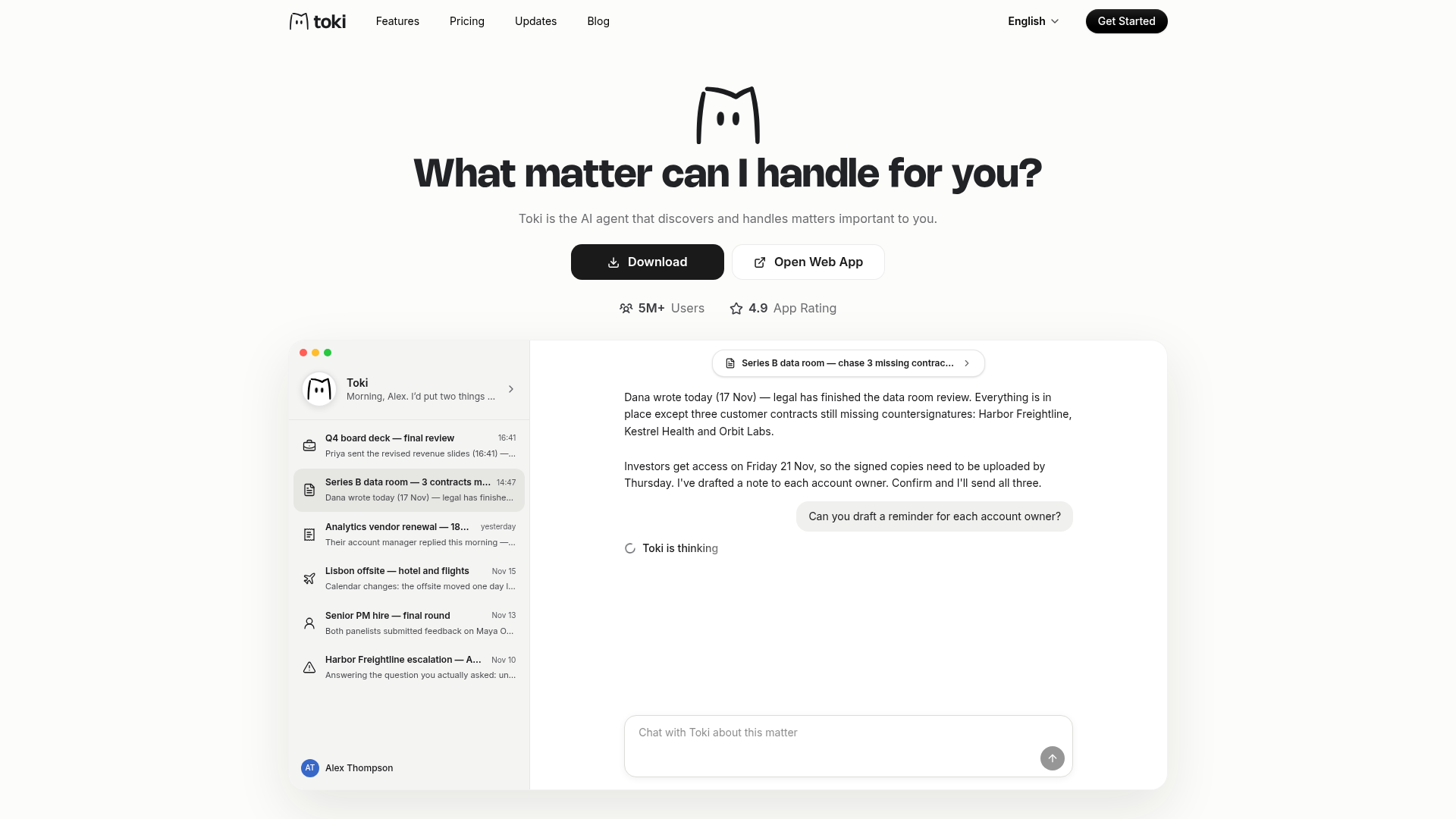
An AI agent that finds your to-dos in email and calendar, then moves them forward
Toki wants to find your to-dos for you by reading your inbox and calendar, then chase each one with your sign-off.
The verdict
Toki bets that your inbox and calendar already hold your to-do list, and that an agent which drafts follow-ups and waits for your OK beats one more list app. Early reviews back the capture side, from voice notes to photographed invites, while doubts gather around calendar visibility and opaque pricing. Forgetful schedulers and voice-first users should try the free tier now; paying should wait until Toki explains its credits.
- Good for
- People who forget appointments; Voice-first schedulers; Freelancers juggling clients
- Skip it if
- Calendar-grid power users; Buyers who need upfront price clarity
- Costs
- Free tier, paid prices not confirmed1
What it does
As Toki describes it.2
- Matter discovery
- Scans synced email, calendars and Slack to surface the tasks and goals it judges most important.
- Voice and chat input
- Accepts plain-language requests by voice or text from the app or the chat apps you already use.
- Image capture
- Reads a photo of a flyer or invite and pulls out the event details.
- Approval before acting
- Asks you to confirm before it sends an email or moves a meeting on your behalf.
- Call Me
- Phones you when something important needs your attention.
- Virtual computer on Pro
- The Pro tier gives the agent a dedicated virtual computer so it can operate other tools to finish a task.
Ways to put it to work
One-week reality check · for anyone weighing a switch from a to-do app
Forward a full week of reminders and appointments on the free tier, then hold Toki's plan up against where your hours really went.
You get: A cheap, evidence-based read on whether its planning fits your actual life.
Flyer to calendar · for the parents and busy households
Snap each school notice or party invite as it arrives and let Toki draft the event, approving it before it lands on the calendar.
You get: Paper invites stop slipping through, with no typing.
Upgrade trigger · for the freelancers managing several clients
Stay on Free until its basic quota blocks real work two weeks running; only then start the Super trial and track credit burn for its seven days.
You get: You pay for the agent only after proving you need the extra capacity.
What it costs
| Plan | Price | Includes |
|---|---|---|
| FreeOur pick | $0/mo | Sync up to 3 calendars, AI scheduling assistant, basic quota for low frequency demand |
| Super | Not legible on pricing page/mo | 100K credits, proactive agent, outreach communications offloaded to the agent |
| Pro | Not confirmed | 200K credits, dedicated virtual computer, 24/7 proactive agent; yearly billing saves 30% |
Prices from toki.com on 22 November 2026.1
Our take: The Free tier is the fair entry point; paid value stays hard to judge until Toki shows readable prices and explains its credits.
What people say
Reaction is sparse and mostly favorable, concentrated in Product Hunt and app-store reviews that love the easy capture and grumble about calendar visibility, onboarding and how clearly the paid tiers are disclosed.
Relying mostly on voice dictation, this reviewer said Toki saved them a lot of time and effort.
Toki made no useful suggestions from their calendar and just built copies of events inside its own chat from detailed audio descriptions.
Where it falls short
- Free plan caps calendar sync at three and offers only a basic quota.
- Product Hunt reviewers say asking about a crowded schedule in chat is harder to use than a conventional calendar view.
- Users still request more planning customization, task priorities and broader integrations.
- Full value depends on granting broad access to your mail and messaging accounts.
Your first hour
- Download the app for iPhone, Android or Mac, or open the web app at app.toki.com
- Connect email, calendars and Slack so Toki can look for matters
- Send a first request by voice, text or a photo of an invite
- Approve the event or message Toki drafts
If it isn't the fit
Dola5 · A messaging-based calendar assistant that turns text, voice messages and images into events.
Pick it when you want the same chat-first capture without an agent that acts on your email.
Questions
- Is there a free trial of the paid plans?
- Toki's pricing page offers first-time subscribers a 7-day trial of Super or Pro for US$0. Anyone who has already used a trial is not eligible for another one.
- Is my data safe with Toki?
- Toki says data is encrypted in transit and at rest. It also says no one at the company accesses your data without your explicit consent.
The call
Give it one honest week of forwarded reminders on the free tier, then decide with the credit math in front of you.
How we scored it
Four scores out of 10, weighted and added. The weights are the same for every tool.
Capability6.5 × 35% = 2.275
Approval-gated actions, phone calls and photo capture go beyond a reminder app, though users still ask for broader integrations and multi-calendar support. What it does
Ease of use7.5 × 20% = 1.50
The path from download to a first captured event is short, and chat input means there is no new interface to learn. Your first hour
Value7.0 × 25% = 1.75
A usable Free plan plus a one-time trial keeps the risk low, but paid figures did not render legibly on Toki's pricing page and a credit has no published conversion. What it costs
Momentum5.5 × 20% = 1.10
Product Hunt shows a 5.0 rating from only 17 reviews and the vendor's 5M+ users claim carries no date, so dated traction evidence is thin.8
Koda score6.6
The parts add to 6.625, rounded half up to one decimal.
Sources
- 1Pricing page · toki.com, read 22 November 2026: pricesReported
- 2Toki · toki.com, read 22 November 2026: capabilitiesReported
- 3play.google.com · read 22 November 2026: the reviewer paraphrased under What people sayReported
- 4apps.apple.com · read 22 November 2026: the reviewer paraphrased under What people sayReported
- 5Dola · producthunt.com, read 22 November 2026: what it isReported
- 6Motion · usemotion.com, read 22 November 2026: what it isReported
- 7Reclaim · reclaim.ai, read 22 November 2026: what it isReported
- 8producthunt.com · read 22 November 2026: momentum evidenceReported
How this review was made
We read 2 pages of toki.com, ran 3 searches and read 4 community posts. Prices were captured on 22 November 2026. Prices and product claims are reported as their source published them. The four scores are the Koda Lab's judgement; the total is our math.
How we scoreCorrectionsLAB REPORT 288